
Updated July 2024 to use YAML code so you can copy and paste the entire solution into your app. I’ll be using this feature for code examples (for the rare Power Apps related blog articles I do) from now on. See the bottom of this article.
This is a short blog post which describes how to calculate a future date that is x number of working days in the future.
A use-case for this might be a ticketing system or similar customer service tool which needs to calculate an SLA resolution target date of a certain number of days after a ticket is created.
Let’s get straight into the code:
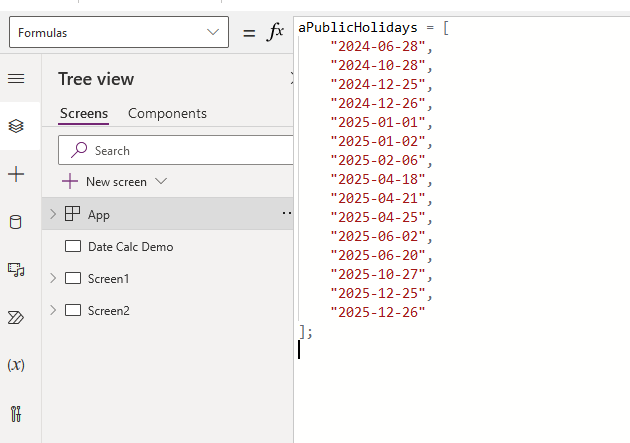
Firstly, we need to define when our public holidays are. At a bare minimum you can simply hard code an array for this, and this is what we’ll do in this demo. However, you can sign up for a free account on https://calendarific.com and create a simple flow to get the public holidays in your country for the next 10 years and put them in a SharePoint list.
Here’s my hardcoded list for NZ public holidays for the remainder of 2024 and the whole of 2025. I’ve used App.Formulas for this and called it aPublicHolidays.
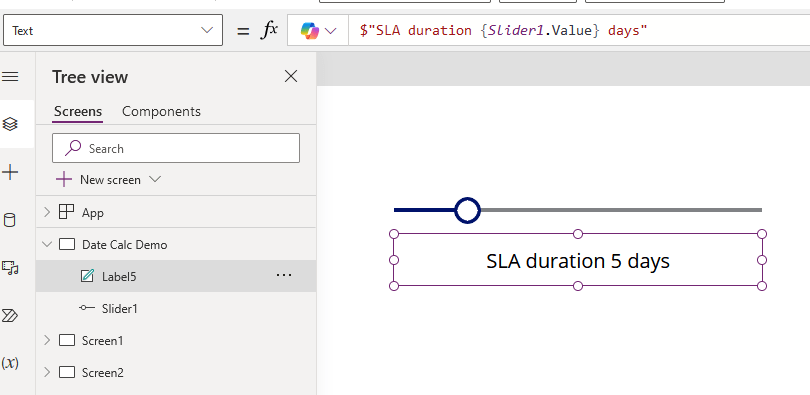
Now I want to calculate the end date of my SLA. Firstly let’s set the SLA duration with a slider for demonstration purposes:
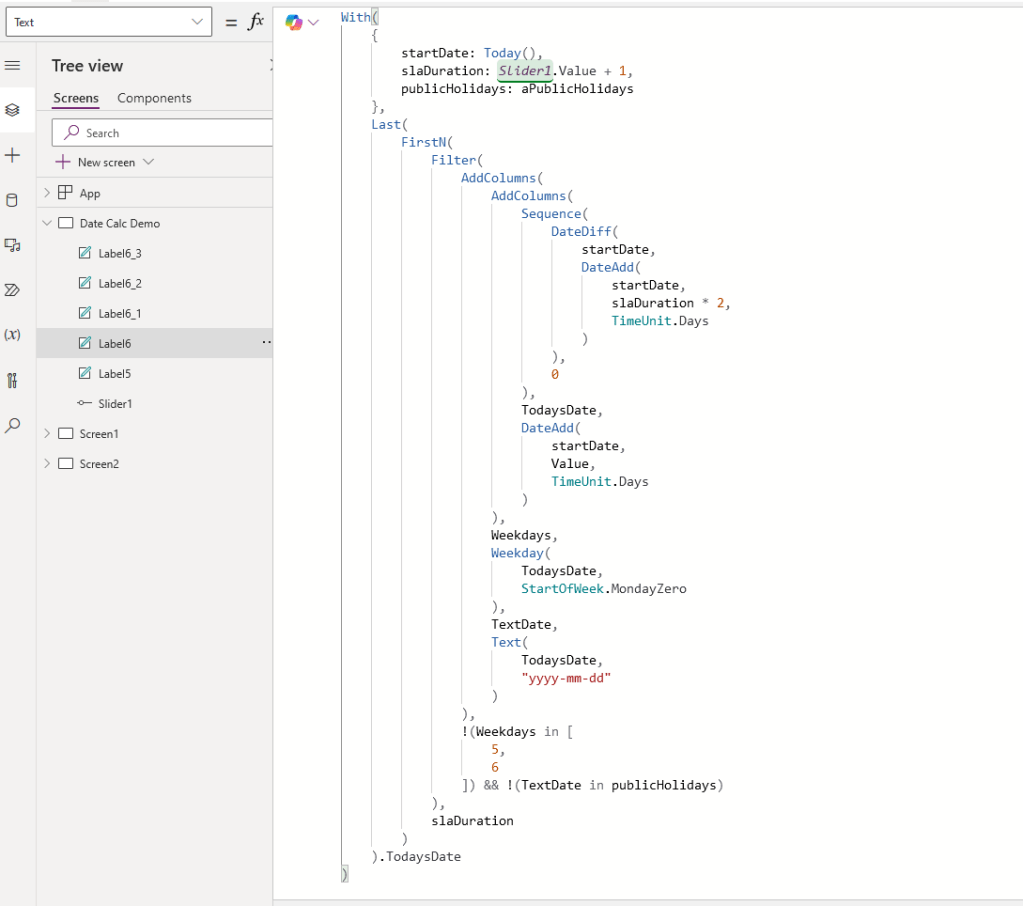
Now the code to calculate an end date. I’ve used Today() as the start date but this could be the created date of a list item or the value of a date picker control or whatever. This is in a text label but it could also be used in a Patch() statement or a date picker control’s default date property etc.
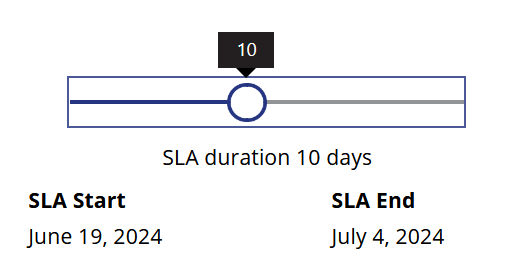
So here’s the output when set to 10 days. It’s currently the 19th of June. 10 working days would normally be 14 calendar days, but because Friday 28th June will be a public holiday (you can see that date in the aPublicHolidays array in the first screen shot) then 10 working days makes this the 4th of July, which is a public holiday here: 🇺🇸, but not here: 🇳🇿.
I won’t torture you with screen shots so here’s the code. Copy this to the clipboard and then right click and Paste code
- cntSLACalculator:
    Control: GroupContainer
    Variant: manualLayoutContainer
    Properties:
      BorderThickness: =1
      Height: =187
      X: =76
      Y: =56
    Children:
    - sldrSLADuration:
        Control: Classic/Slider
        Properties:
          Default: =5
          Max: =21
          Min: =1
          Height: =48
          Width: =Parent.Width - 40
          X: =20
          Y: =8
    - lblSLADuration:
        Control: Label
        Properties:
          Text: =$"SLA duration {sldrSLADuration.Value} days"
          Align: =Align.Center
          Height: =43
          Width: =Parent.Width
          Y: =56
    - lblSLAEndDate:
        Control: Label
        Properties:
          Text: |-
            =With(
                {
                    startDate: Today(),
                    slaDuration: sldrSLADuration.Value,
                    publicHolidays: [
                        "2024-06-28",
                        "2024-10-28",
                        "2024-12-25",
                        "2024-12-26",
                        "2025-01-01",
                        "2025-01-02",
                        "2025-02-06",
                        "2025-04-18",
                        "2025-04-21",
                        "2025-04-25",
                        "2025-06-02",
                        "2025-06-20",
                        "2025-10-27",
                        "2025-12-25",
                        "2025-12-26"
                    ]
                },
                Last(
                    FirstN(
                        Filter(
                            AddColumns(
                                AddColumns(
                                    Sequence(
                                        DateDiff(
                                            startDate,
                                            DateAdd(
                                                startDate,
                                                slaDuration * 2,
                                                TimeUnit.Days
                                            )
                                        ),
                                        0
                                    ),
                                    TodaysDate,
                                    DateAdd(
                                        startDate,
                                        Value,
                                        TimeUnit.Days
                                    )
                                ),
                                Weekdays,
                                Weekday(
                                    TodaysDate,
                                    StartOfWeek.MondayZero
                                ),
                                TextDate,
                                Text(
                                    TodaysDate,
                                    "yyyy-mm-dd"
                                )
                            ),
                            !(Weekdays in [
                                5,
                                6
                            ]) && !(TextDate in publicHolidays)
                        ),
                        slaDuration
                    )
                ).TodaysDate
            )
          Align: =Align.Center
          Height: =43
          Width: =(Parent.Width / 2) - 1
          X: =Parent.Width / 2
          Y: =139
    - lblSLAStartDate:
        Control: Label
        Properties:
          Text: =Today()
          Align: =Align.Center
          Height: =43
          Width: =Parent.Width / 2
          X: =1
          Y: =139
    - lblSLAEndHeader:
        Control: Label
        Properties:
          Text: ="SLA End"
          Align: =Align.Center
          Fill: =RGBA(186, 202, 226, 1)
          Width: '=(Parent.Width / 2) -1 '
          X: =Parent.Width / 2
          Y: =99
    - lblSLAStartHeader:
        Control: Label
        Properties:
          Text: ="SLA Start"
          Align: =Align.Center
          Fill: =RGBA(186, 202, 226, 1)
          Width: =Parent.Width / 2
          X: =1
          Y: =99
That’s it! If you like my work as much as I like the cool, delicious taste of a juicy watermelon, then feel free to donate!


 William's IT Blog 🍉