This article comes from a question on the MS Community forums. The answer is a bit too long to post in the replies so I thought I’d do a blog post.
I imagine it’s a reasonably common requirement: How long has it been since some something happened, but only during working hours? Helpdesk tickets and other things that have SLAs, where a response or resolution is required in a certain time, but the clock stops outside of the agreement or service hours etc.
The general theory behind this to establish the total duration the thing has existed, or in other words the duration between two timestamps, then subtract the amount of time the clock was stopped.
The tricky bit is calculating the time the clock is stopped. To do this we look at each day in turn from the start date to the end date inclusive, and figure out how many minutes we need to exclude based on these rules (for this example we’re working in minutes. Start of business is 7:30am and close of business is 6pm):
- If it’s the start date, then it’s the time between close of business and midnight (360 mins)
- If it’s the end date, then it’s the time between midnight and start of business (450 mins)
- If it’s a weekday in between then it’s those two durations added together (810 mins)
- If it’s a weekend then it’s simply the whole day (1440 mins)
Right, let’s get into it. As always, everything is the same in Power Automate and Logic Apps so this blog is for both – choose your fighter.
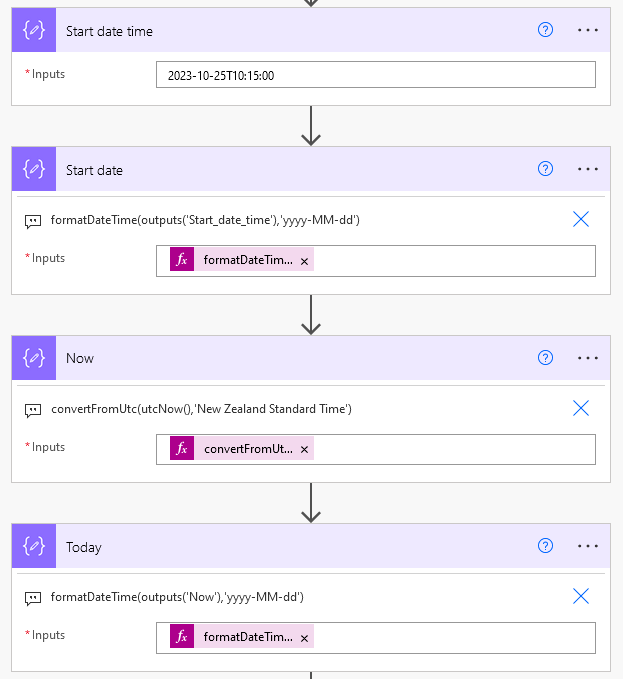
First get the two timestamps. For both timestamps we need the date and time, and just the date.

The ones with the time are used for calculating the overall duration while the date only is used in some looping logic. I’m in NZ so I’ve converted from UTC to NZ time. My start date/time is hand written, but if it came from a SharePoint date column or other UTC source I would have to convert that too. Put your own timezone in here.
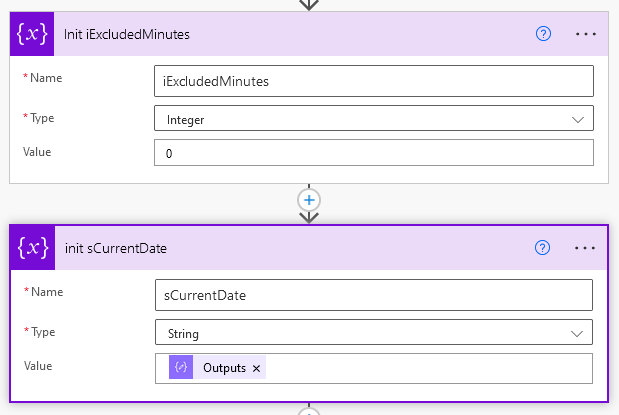
Initialise a couple of variables. Excluded minutes as integer and current date as string. Drop the output from the compose action called Today that you can see in the previous screen shot in there.
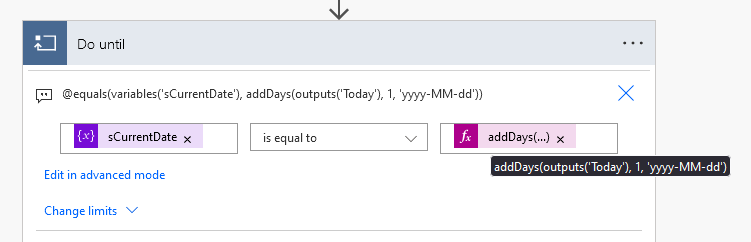
Do until loop with this condition. Inside this loop we increment the variable sCurrentDate by one day, so this loops round until that variable reaches the current day (or ending date). Actually the current day plus one day because the loop exits as soon as that condition is met and won’t execute on that day.
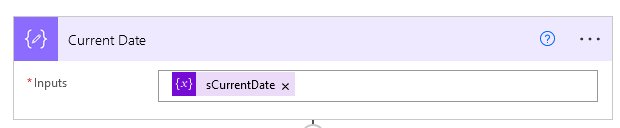
Inside the loop, put the content of the sCurrentDate variable in a Compose:
Get the dayOfWeek value for it
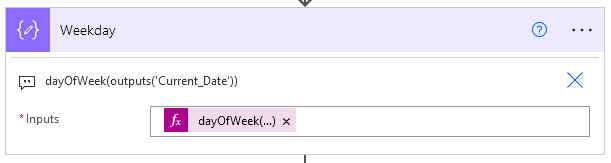
If the value of Weekday is 0 or 7 then it is a weekend. Therefore increment excluded minutes variable by 1440. If not then we do more stuff in the “If no/false” branch
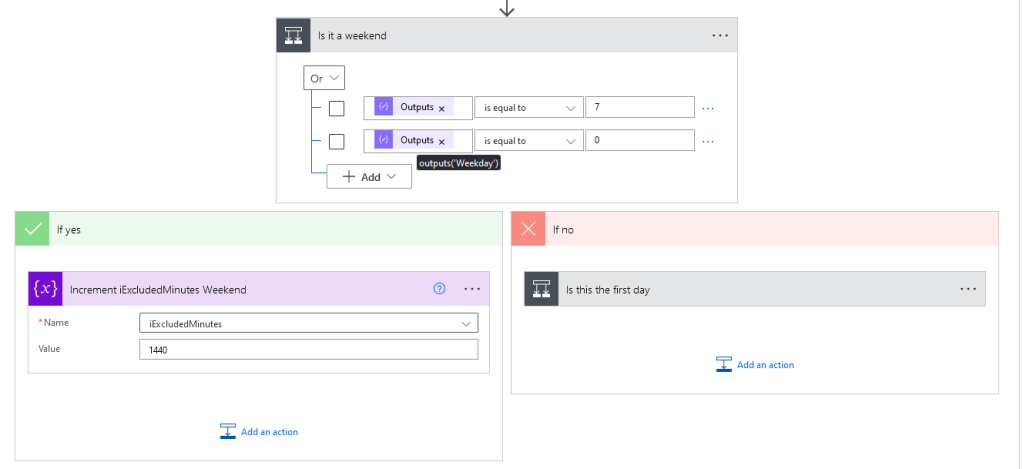
Is it the first day? Compare the current date with the start date and if yes/true, add the number of minutes from close of business until midnight (360 mins). If no/false then do more stuff

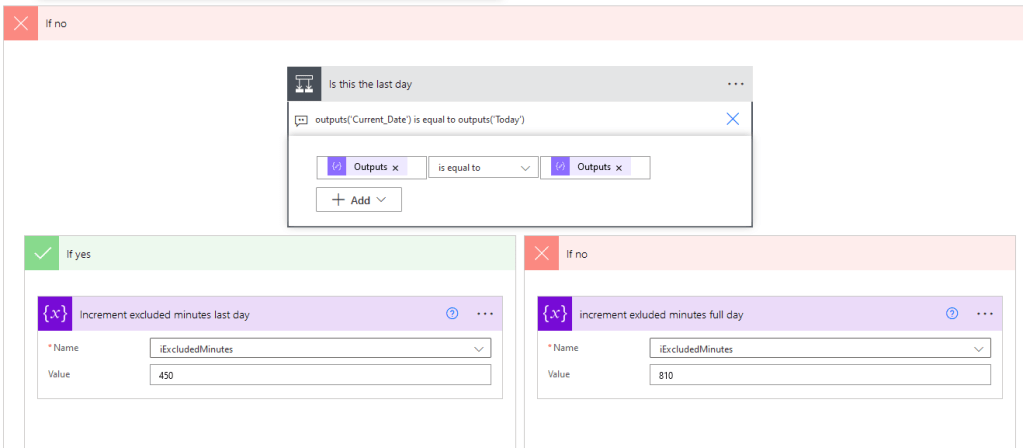
If it’s the last day then add the minutes from midnight to the start of business (450) and if not then the remaining/default value is 810. That is we’ve followed the If no/false branch down: Not a weekend, not the first day, not the last day. Therefore it’s a day in between and we should exclude the full number of non-working minutes on a weekday.
Finally add 1 day to the sCurrentDate variable
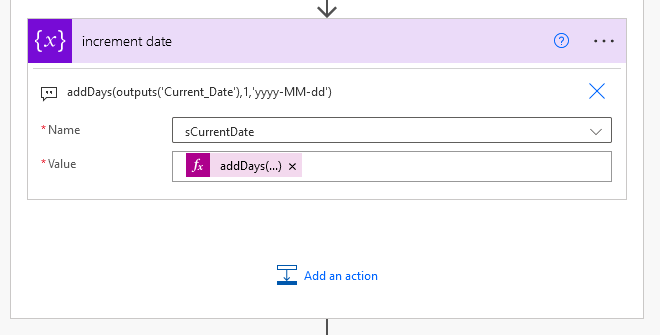
That is the end of the Do until loop. The following actions are outside (below) the loop
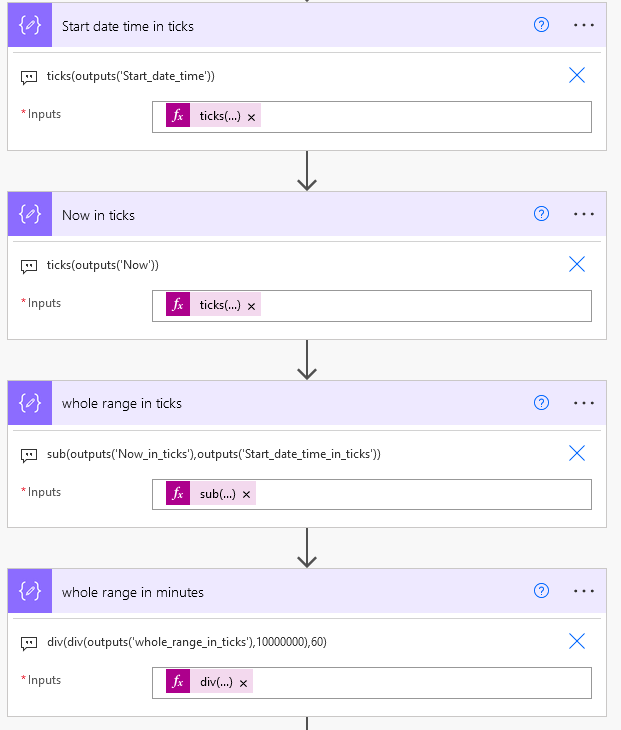
Now we’re going to use the ticks() function to calculate the total time difference. Convert the two timestamps to ticks then subtract the earlier one from the later one. The result is the number of ticks between the timestamps. A tick is 100 nanoseconds, so to get minutes, divide by 10,000,000 (10 million) for seconds then divide that by 60 for minutes
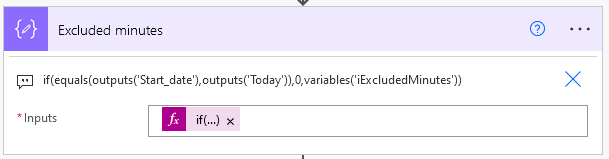
Now we just need to account for when the start and end date are on the same day. There should be no excluded minutes:
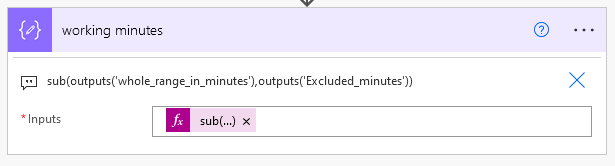
Now finally subtract the excluded minutes from the total minutes. This is the working duration between the timestamps
This is quite a simple solution to this problem. It assumes the two timestamps will never be outside of the working day. If they are, the result will be wrong. To get around that, you would have to include more calculations within the loop. For example if the start time is prior to start of business on the first day you would have to calculate the seconds from the start time to start of business and subtract that from the excluded minutes on that day. If the start time is after the end of business on the start date then the excluded minutes is 0 for that day and the opposite will be the case for the end date. If you want to know how, please write in the comments.

 William's IT Blog 🍉
Hi,
Thanks for sharing. need to understand your logic “How do you add the string to an integer value? You define “sCurrentDate” as “String” and addDay to string???
LikeLike
Dates and date/time stamps are strings. Date/time functions such as addDays will work on strings if they are in the right format to be interpreted as a date or date/time. See the .NET documentation for details, but as a rule, any date/time you get out of a Microsoft service like a SharePoint date column or the output of any date/time function like utcNow() will already be in a .NET compatible format. Unlike many other programming languages, you don’t need to separately parse a string to turn it into a date or date/time data type, the conversion is implicit at run time.
LikeLike
Thanks for sharing. Great work but can you explain how to add String an integer value. Please check the “sCurrentDate” variable definition and later you are adding “increment date” variable with an integer. Did you test it?
LikeLike
See below
LikeLike
Thanks for the information and speedy response.
LikeLike